
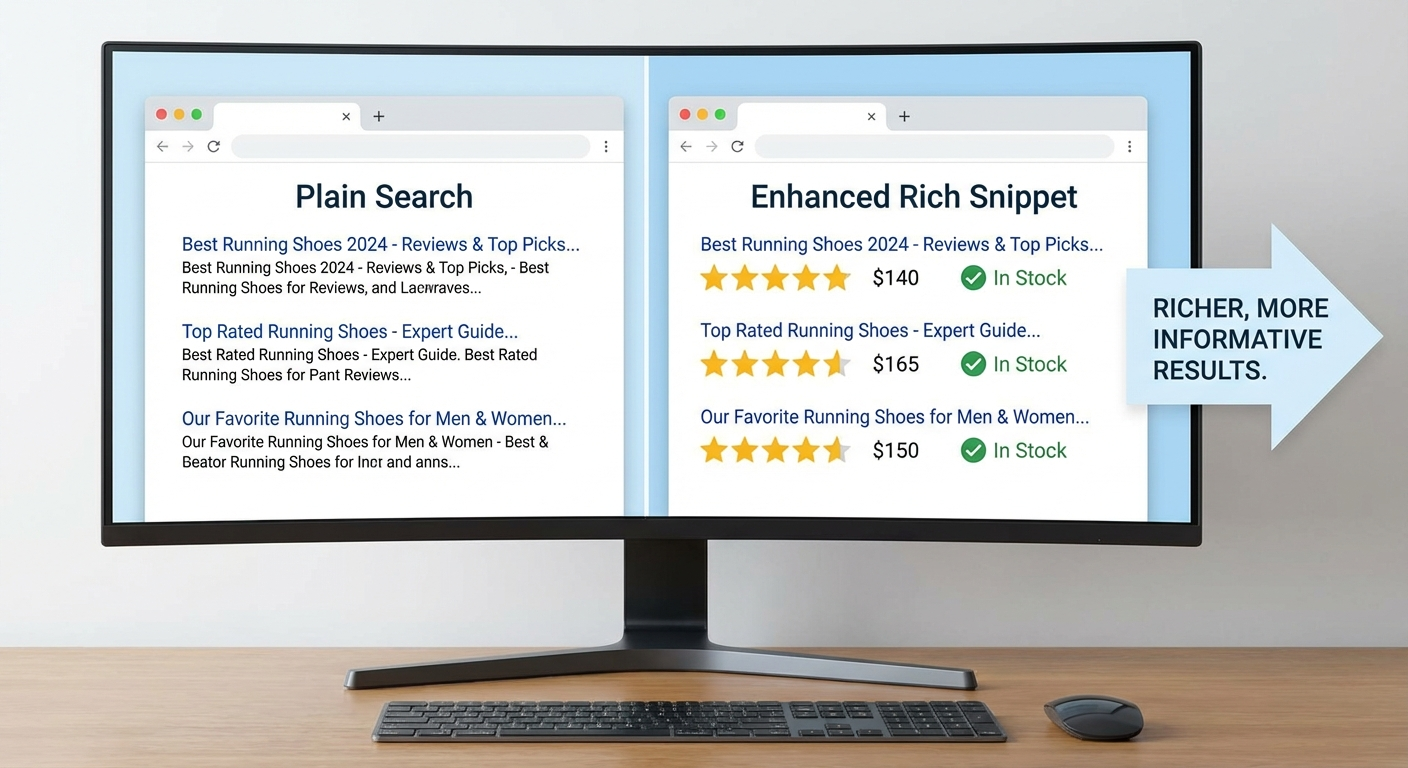
When someone searches for a business like yours, two results appear: one shows a plain blue link with a basic description. The other displays star ratings, business hours, price range, and a click-to-call button—all before the person even visits the website.
Which one gets the click?
The difference is schema markup—code that tells Google exactly what your business is, where it’s located, and what makes it worth visiting. For local businesses in Southwest Florida and beyond, this invisible optimization can mean the difference between showing up as a rich, informative result or getting buried beneath competitors who’ve done the technical work.
What Is Local Schema Markup?
Local schema markup (also called structured data) is a standardized code format that helps search engines understand your website’s content. Instead of making Google guess that your address is an address or your phone number is a phone number, schema explicitly labels each piece of information.
Think of it like this: your website is a document written in English. Schema is the translation into Google’s native language. When Google understands your content perfectly, it can display that information directly in search results—creating those eye-catching rich snippets that drive clicks.
For local businesses, the most important schema types include:
- LocalBusiness — Your core business information
- Organization — Brand details and social profiles
- OpeningHoursSpecification — When you’re open
- GeoCoordinates — Your exact location
- Review/AggregateRating — Customer ratings
- Service — What you offer
- FAQPage — Common questions about your business

Why Schema Markup Matters for Local Search
If you’ve already optimized your Google Business Profile, you might wonder why you need schema on your website too. Here’s the key difference: your Google Business Profile controls what shows up in the local map pack. Schema markup influences what shows up in organic search results—the blue links below the map.
The Rich Results Advantage
Businesses with proper schema markup can display:
- Star ratings — Average review score visible at a glance
- Review count — “4.8 stars from 127 reviews” builds instant trust
- Business hours — “Open now” or “Closes at 6 PM” without clicking
- Price range — ”$” to ”$$$$” sets expectations
- Services offered — Key offerings listed in the result
- FAQ answers — Questions answered directly in search
A study by Milestone Research found that pages with schema markup rank an average of four positions higher than those without. For local businesses, where the top three results capture the majority of clicks, those four positions can be the difference between thriving and invisible.
Standing Out in Southwest Florida
For businesses in Naples, Fort Myers, Cape Coral, and across SWFL, local competition is fierce—especially in seasonal markets where snowbird traffic drives revenue. When a visitor searches “best HVAC repair Fort Myers” or “nail salon near me Naples,” rich results make your listing pop against competitors who haven’t implemented schema.
The businesses capturing these enhanced listings aren’t necessarily bigger or better reviewed. They’ve simply done the technical work to speak Google’s language.

How to Add Local Schema to Your Website
You have three main options for implementing schema markup: JSON-LD (recommended), Microdata, or RDFa. Google explicitly recommends JSON-LD because it’s easiest to maintain and doesn’t interfere with your page’s HTML structure.
Step 1: Start with LocalBusiness Schema
Here’s a basic LocalBusiness schema template you can customize:
{
  "@context": "https://schema.org",
  "@type": "LocalBusiness",
  "name": "Your Business Name",
  "image": "https://yoursite.com/images/storefront.jpg",
  "telephone": "+1-239-555-0123",
  "email": "info@yourbusiness.com",
  "address": {
    "@type": "PostalAddress",
    "streetAddress": "123 Main Street",
    "addressLocality": "Naples",
    "addressRegion": "FL",
    "postalCode": "34102",
    "addressCountry": "US"
  },
  "geo": {
    "@type": "GeoCoordinates",
    "latitude": 26.142,
    "longitude": -81.7948
  },
  "url": "https://yourbusiness.com",
  "openingHoursSpecification": [
    {
      "@type": "OpeningHoursSpecification",
      "dayOfWeek": ["Monday", "Tuesday", "Wednesday", "Thursday", "Friday"],
      "opens": "08:00",
      "closes": "17:00"
    }
  ],
  "priceRange": "$$"
}
This code goes in the <head> section of your homepage, wrapped in a <script type="application/ld+json"> tag.
Step 2: Choose Your Specific Business Type
Google recognizes over 100 specific business types within LocalBusiness. Using the most specific type helps Google understand exactly what you do:
| Business Category | Schema Type |
|---|---|
| Restaurant/Bar | Restaurant, BarOrNightClub, CafeOrCoffeeShop |
| Home Services | HomeAndConstructionBusiness, Plumber, Electrician, HVAC |
| Health/Beauty | BeautySalon, HairSalon, DaySpa, HealthAndBeautyBusiness |
| Automotive | AutoRepair, AutoDealer, GasStation |
| Professional Services | LegalService, AccountingService, FinancialService |
| Retail | Store, ClothingStore, HardwareStore |
| Medical | Physician, Dentist, MedicalClinic |
Replace "@type": "LocalBusiness" with your specific type, like "@type": "Plumber" or "@type": "BeautySalon".
Step 3: Add Review Schema (If You Have Reviews)
If you’re collecting reviews on your website (not just on Google), you can add AggregateRating schema to display star ratings in search results:
"aggregateRating": {
  "@type": "AggregateRating",
  "ratingValue": "4.8",
  "reviewCount": "127",
  "bestRating": "5",
  "worstRating": "1"
}
Important: Only add review schema if the reviews exist on your website. Google can penalize sites for adding rating schema without actual review content to back it up. If reviews live only on Google or Yelp, don’t add this—let Google pull that data from the source.
For strategies on getting more reviews, see our guide on automating review generation.
Step 4: Add Service Schema
If you offer specific services, add Service schema to help Google understand (and potentially display) what you do:
"hasOfferCatalog": {
  "@type": "OfferCatalog",
  "name": "Services",
  "itemListElement": [
    {
      "@type": "Offer",
      "itemOffered": {
        "@type": "Service",
        "name": "AC Repair",
        "description": "24/7 emergency air conditioning repair for homes and businesses"
      }
    },
    {
      "@type": "Offer",
      "itemOffered": {
        "@type": "Service",
        "name": "AC Installation",
        "description": "Professional installation of new air conditioning systems"
      }
    }
  ]
}
Step 5: Add FAQ Schema for Common Questions
FAQ schema is one of the most powerful types for local businesses. When you add it, Google may display your FAQs directly in search results, taking up more real estate and providing answers before the click:
{
  "@context": "https://schema.org",
  "@type": "FAQPage",
  "mainEntity": [
    {
      "@type": "Question",
      "name": "What areas do you serve?",
      "acceptedAnswer": {
        "@type": "Answer",
        "text": "We serve Naples, Fort Myers, Cape Coral, Bonita Springs, and all of Lee and Collier County."
      }
    },
    {
      "@type": "Question",
      "name": "Do you offer emergency service?",
      "acceptedAnswer": {
        "@type": "Answer",
        "text": "Yes, we provide 24/7 emergency service with no additional after-hours fees."
      }
    }
  ]
}
This schema should appear on pages with actual FAQ content—don’t add it to pages without visible questions and answers.
Testing Your Schema Markup
Before pushing schema live, validate it with Google’s tools:
- Rich Results Test — Shows exactly how your schema will appear in search results
- Schema Markup Validator — Catches syntax errors and missing fields
- Google Search Console — Monitor for schema errors after deployment
Common mistakes to avoid:
- Mismatched information — Your schema must match what’s visible on the page. If your schema says you’re open until 6 PM but your website says 5 PM, Google may distrust both.
- Missing required fields — Each schema type has required properties. LocalBusiness needs at minimum: name, address, and telephone.
- Fake reviews — Adding review schema without actual reviews can result in manual penalties.
- Multiple conflicting schemas — One clear LocalBusiness schema is better than several competing ones.
How Schema Works with Your Overall Local SEO
Schema markup doesn’t exist in isolation. It’s one piece of a comprehensive local SEO strategy that includes:
- Google Business Profile — Your map pack presence
- Local citations — Consistent NAP (name, address, phone) across the web
- On-page optimization — Location-based keywords in your content
- Reviews — Both quantity and quality matter
- Schema markup — Helping Google understand all of the above
Think of schema as the glue that connects your website’s content to Google’s understanding of your business. It reinforces signals from your Google Business Profile, validates your contact information, and provides additional context that helps Google rank you for relevant local searches.
Implementation Options
You have several paths to implement schema markup:
DIY with a Plugin (Easy)
If you’re on WordPress, plugins like Rank Math, Yoast SEO, or Schema Pro can add basic LocalBusiness schema without coding. They provide forms where you fill in your business details, and the plugin generates the JSON-LD automatically.
Pros: Quick, no coding required Cons: Limited customization, may miss advanced schema types
Manual Implementation (Moderate)
Copy a template like the ones above, customize with your information, and add to your website’s HTML. This works on any platform but requires basic comfort with code.
Pros: Full control, no plugin dependencies Cons: Requires some technical knowledge, manual updates
Professional Implementation (Recommended for Complex Sites)
For businesses with multiple locations, complex services, or e-commerce components, professional implementation ensures schema is comprehensive, validated, and maintained.
Our local business services include schema markup implementation as part of comprehensive local SEO packages.
Frequently Asked Questions
How long does it take to see results from schema markup?
Google typically processes schema changes within a few days to a few weeks. However, appearing in rich results isn’t guaranteed—it depends on Google’s assessment of your content quality, site authority, and search query relevance. Most businesses see increased click-through rates within 1-3 months of proper implementation.
Can schema markup hurt my rankings?
Incorrect schema can trigger manual penalties, particularly for review markup without actual reviews or mismatched information. Properly implemented schema has no downside and significant upside. Always validate before deploying.
Do I need schema if I already have a Google Business Profile?
Yes. Your Google Business Profile controls your presence in the local map pack. Schema markup influences your appearance in organic search results (the blue links). For maximum visibility, you need both working together.
Does schema work for multi-location businesses?
Absolutely. You’ll need separate LocalBusiness schema for each location, typically on each location’s dedicated page. Each schema block should include that specific location’s address, phone number, and hours.
Get More Visibility in Local Search
Schema markup is technical, but the payoff is real: richer search results, higher click-through rates, and better visibility against competitors who haven’t done the work.
If implementing schema feels overwhelming, or you want to ensure it’s done right the first time, reach out to our team. We’ll audit your current setup, implement comprehensive schema markup, and make sure Google sees your business exactly as you want it seen.
Combined with proper Google Business Profile optimization and automated review generation, schema markup completes the foundation for local search dominance in Naples, Fort Myers, Cape Coral, and beyond.