
You recorded a 20-minute podcast episode. Or wrote a 1,500-word blog post. Or filmed a quick behind-the-scenes video for Instagram. You hit publish and moved on.
That single piece of content? It could have been a week’s worth of social posts, an email newsletter, a YouTube short, three LinkedIn articles, and a customer FAQ. Instead, it lived in one place and you started from scratch the next time.
This is the content repurposing gap—and it’s where most small businesses leave enormous value on the table. Creating good content takes real time and creative energy. Distributing it across every channel it deserves to reach? That’s where AI changes the math entirely.
In 2026, AI-powered repurposing tools can take a single source piece and transform it into a full content ecosystem in minutes. Here’s how to build a system that works for your business—without adding hours to your week.
Why Content Repurposing Matters More Than Ever
The average social media post has a lifespan measured in hours. A LinkedIn post might get seen by 10% of your followers. An email newsletter reaches a different audience than your blog. A short video on Instagram Reels attracts people who would never read an article.
Your potential customers live on different platforms and consume content in different ways. A prospect who would scroll past your blog post might stop for a 60-second reel. A client who ignores your tweets might read every email you send.
Repurposing isn’t about laziness or cutting corners. It’s about recognizing that your best ideas deserve more than one shot at finding the right audience. When done with AI, it’s efficient enough that you can actually sustain it.
The Repurposing Pyramid: Start With One Long-Form Anchor
The most effective repurposing systems start with a single long-form “anchor” piece—something substantial enough to generate multiple shorter formats. Common anchor formats include:
- Long blog posts (1,200+ words)
- Podcast episodes (20+ minutes)
- YouTube videos (10+ minutes)
- Webinar recordings
- Customer interviews or case studies
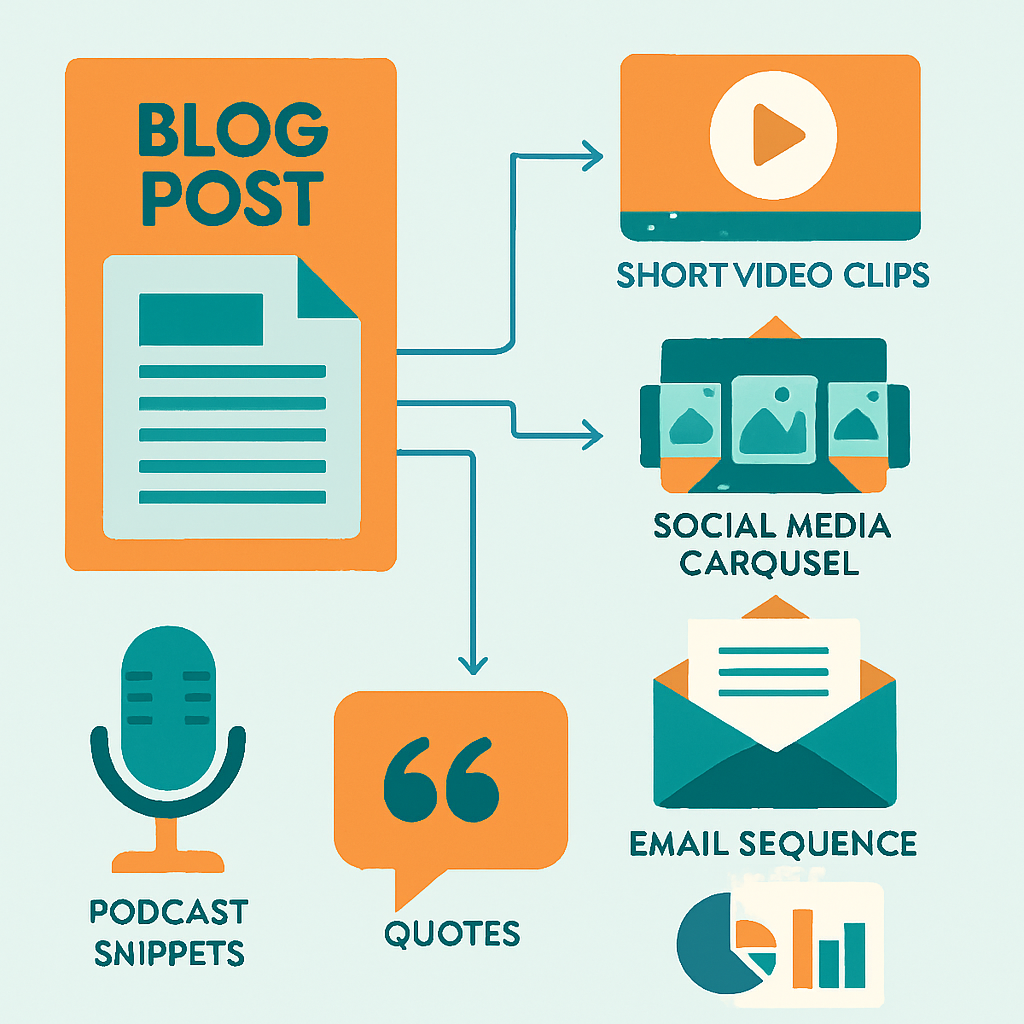
From one anchor piece, you can typically generate:
- 5–10 social media posts (LinkedIn, Instagram, Facebook, X/Twitter)
- 1–2 email newsletters
- 3–5 short video scripts (Reels, TikTok, Shorts)
- 1 carousel or slide deck
- 5–10 quote graphics
- 1 condensed FAQ or resource page
The pyramid flows downward: the most time-intensive piece sits at the top, and everything below it gets easier because the core thinking is already done.
Step 1: Choose Your AI Repurposing Workflow
Not all AI tools approach content repurposing the same way. The right setup depends on your existing content format and where you want to distribute.
If Your Anchor Is Text (Blog Posts, Articles)
Claude or ChatGPT are your best starting points. You paste in the full article and give structured prompts:
- “Write five LinkedIn posts from this article. Each should focus on a different key point. Keep them under 200 words and end with a question.”
- “Turn this blog post into a 300-word email newsletter intro.”
- “Extract the 10 most shareable quotes from this article.”
- “Write a 60-second video script based on the main argument of this post.”
You’re not asking AI to invent new ideas—you’re asking it to reshape the ideas you already developed into the format the platform requires.
Notion AI works well if your team uses Notion for content drafts. It can summarize, reformat, and restructure content directly inside your existing workspace.
If Your Anchor Is Audio (Podcasts, Interviews)
First, you need a transcript. Tools like Descript, Otter.ai, or Riverside.fm transcribe audio automatically with high accuracy. Once you have the transcript, you’re back in text territory and can use any LLM to generate derivative content.
Castmagic is purpose-built for podcasters and automates much of this pipeline: it transcribes, then generates show notes, timestamps, social clips, newsletters, and quote graphics without additional prompts.
If Your Anchor Is Video
Video repurposing has the most tools in 2026, because the demand is high and the workflow is complex.
- Opus Clip analyzes long videos and automatically cuts them into short clips likely to perform well on social media—including adding captions and identifying emotional peaks in the conversation.
- Descript lets you edit video by editing text, then export clips for different platforms.
- Pictory turns transcripts or articles into short video clips with stock footage automatically.
The key is to get to text as fast as possible. Once your video or audio is transcribed, the repurposing floodgates open.
Step 2: Build Reusable Prompt Templates
Repurposing with AI gets dramatically faster when you stop writing prompts from scratch. Build a library of reusable templates for your most common outputs.
Here’s a simple prompt template system you can copy:
LinkedIn post template:
“Using the article below, write a LinkedIn post that opens with a counterintuitive statement, shares 3 specific insights from the article, and ends with a question to drive comments. Max 200 words. Tone: professional but approachable. [paste article]”
Email newsletter template:
“Using the content below, write an email newsletter with: subject line, preview text (max 90 chars), 3-paragraph body that teases the key insights without giving everything away, and a clear CTA to read the full article. [paste content]”
Instagram caption template:
“Write 3 Instagram caption options based on the content below. Each should be under 150 words, start with an attention-grabbing first line, include 5 relevant hashtags, and end with a question or CTA. [paste content]”
Save these templates somewhere you can access quickly—a Notion doc, a Google Doc, or even a note in your phone. The goal is to make repurposing a 10-minute task, not a 45-minute one.

Step 3: Automate the Distribution
Generating the content is step one. Getting it published consistently is step two—and this is where automation tools like Zapier, Make, or n8n become valuable.
Here’s a simple automation flow many small businesses use:
- New blog post published → Trigger fires
- Make/Zapier calls OpenAI API → Generates LinkedIn post, Twitter thread, and email newsletter copy from the article
- Content is saved to a Google Sheet or Notion database for review
- Approved content is pushed to Buffer, Later, or Hootsuite for scheduling
- Email newsletter draft is created in Mailchimp or Kit (formerly ConvertKit)
You review and approve—you don’t create from scratch. The system does the heavy lifting.
For businesses already using a CRM and marketing automation stack, this pipeline can be extended further: segment your audience and send slightly different email versions to different customer groups, all from the same source piece.
Step 4: Adapt, Don’t Just Copy
The most common repurposing mistake is copy-pasting content across platforms without adapting it to the platform’s culture and format. LinkedIn audiences expect professional insights. Instagram audiences want visual storytelling and emotion. Twitter/X is about punchy takes and debate. Email is about personal value.
A good AI-generated repurposed post isn’t a paste of your article. It’s a reimagining of the same idea in the language of the platform.
Give AI clear context when prompting:
- “The audience on LinkedIn is small business owners interested in efficiency.”
- “The tone for Instagram should be warmer and more personal than the blog.”
- “The email audience already knows us—skip the intro and lead with the value.”
The more specific your prompts, the better the output. Treat AI like a talented junior writer who needs clear direction, not a magic machine that produces ready-to-publish copy on the first pass.
Platforms and Cadence: A Starter Framework
If you’re overwhelmed figuring out where to start, here’s a simple weekly content cadence built around one anchor piece:
| Day | Activity |
|---|---|
| Monday | Publish anchor piece (blog post or podcast episode) |
| Tuesday | Publish LinkedIn post #1 (key insight from anchor) |
| Wednesday | Send email newsletter (teases anchor, links to full piece) |
| Thursday | Publish Instagram carousel (visual summary of anchor) |
| Friday | Publish LinkedIn post #2 (a different angle or quote) |
| Weekend | Publish short-form video (Reels/Shorts based on anchor) |
One anchor piece. Six distribution touchpoints. Most of the copy generated by AI. All you need to do is review, tweak tone, and hit publish.
This level of output used to require a full-time content team. With AI repurposing tools, a solo business owner can sustain it working a few focused hours per week.

What AI Can’t Do (And Where You Still Matter)
AI repurposing tools are genuinely useful, but they have real limits:
They don’t know your business like you do. The best content comes from real experience—client stories, lessons learned, opinions formed from years in your industry. AI can reshape that content beautifully, but it can’t originate it. Your job is to create the anchor piece with real substance. AI’s job is to help it travel further.
They produce generic output without good prompts. Generic prompts (“write a LinkedIn post about this article”) produce generic content. Investing 15 minutes to build good prompt templates once pays dividends for months.
They can miss tone. Every business has a voice. Review AI-generated content before publishing—not to rewrite it from scratch, but to adjust the moments that don’t sound like you.
They can’t replace genuine engagement. Social media rewards real conversation. AI can help you post consistently, but responding to comments, engaging with your community, and building relationships still requires a human.
Think of AI repurposing as your content distribution engine—not your brand voice. You provide the original thinking; AI helps it reach more people.
Tools Worth Trying in 2026
Here’s a quick reference for building your repurposing stack:
- Transcription: Otter.ai, Descript, Riverside.fm, Whisper (open source)
- Text repurposing: Claude, ChatGPT, Gemini, Notion AI
- Video repurposing: Opus Clip, Descript, Pictory, Kapwing
- Podcast repurposing: Castmagic, Podium, Transistor + AI
- Scheduling: Buffer, Later, Hootsuite, Metricool
- Automation: Zapier, Make, n8n
- Email: Kit (ConvertKit), Mailchimp, ActiveCampaign
You don’t need all of these. Start with one anchor format and one destination channel. Build the system for that workflow first, then expand.
The ROI of Getting This Right
Here’s the math that makes content repurposing worth building:
- Average time to write a 1,500-word blog post: 3–4 hours
- Average time to manually write all derivative content: 3–5 additional hours
- Average time to repurpose with AI: 30–60 minutes
Over a year, if you publish one anchor piece per week, AI repurposing saves roughly 100–200 hours of content creation time. That’s 4–8 weeks of full-time work redirected toward serving clients, growing your business, or simply not working nights and weekends.
But the bigger win is consistency. Most small businesses create great content occasionally and then go quiet for weeks. AI repurposing makes sustained, multi-channel presence achievable without burning out—and consistent presence is what builds trust, drives traffic, and fills your sales funnel over time.
AI content repurposing isn’t about flooding the internet with low-quality AI-generated noise. It’s about respecting the time and creative energy you put into your best ideas—and making sure those ideas reach as many of the right people as possible.
Create once. Let AI distribute it everywhere it deserves to go.
If you’re ready to build a content system that actually scales, Monsoft Solutions can help. We work with small businesses to design and implement AI automation workflows that run in the background while you focus on the work only you can do.