
You’ve heard about chatbots. You’ve set up some automations. Maybe you’re running email sequences or using AI to draft social posts. That’s great — but it’s only the beginning.
AI agents are the next level. They don’t just respond to questions or trigger pre-built workflows. They think through multi-step problems, use tools to take action, check their own work, and keep going until the job is done. In 2026, they’re no longer experimental. Small businesses are using them today — and the ones that figure it out early are building a serious operational advantage.
This guide explains exactly what AI agents are, how they differ from what you’re probably already using, and how to put them to work in your business right now.
What Is an AI Agent? (And How It’s Different)
Most AI tools you’ve used are reactive. You give input; they produce output. You ask a chatbot a question; it answers. You trigger an automation; it runs a sequence.
An AI agent is proactive and autonomous. You give it a goal. It figures out how to reach that goal, uses tools to take action, monitors results, adjusts its approach, and reports back when it’s done — or asks for input only when it genuinely needs it.
The key differences:
| Feature | Standard AI Tool | AI Agent |
|---|---|---|
| Works from | Input → Output | Goal → Plan → Actions → Result |
| Uses tools | No (or limited) | Yes — web, email, CRM, APIs |
| Multi-step | Rarely | Always |
| Self-corrects | No | Yes |
| Needs supervision | Every step | Only for exceptions |
Think of it this way: a standard AI tool is like a calculator — powerful, but you do the thinking. An AI agent is like a capable employee — you set the objective and trust them to handle execution.

What AI Agents Can Actually Do for Your Business
This is where it gets concrete. Here are the highest-impact use cases for small businesses in 2026:
1. Lead Research and Qualification
You have a new inquiry come in. Instead of manually researching the prospect, your AI agent:
- Looks up the business or person online
- Pulls any relevant social media or news
- Cross-references your CRM for prior touchpoints
- Scores the lead based on your criteria
- Drafts a personalized first-touch email
- Adds them to the right nurture sequence
All without you touching it. Your sales team gets a research brief and a draft email, ready to review and send.
2. Customer Support Resolution
Instead of routing every support request to a human, an AI agent:
- Understands what the customer is asking
- Checks your knowledge base, order history, or account records
- Resolves routine issues automatically (reschedule, refund policy, FAQ)
- Escalates complex or sensitive cases to a real person with context already summarized
This isn’t a chatbot that hits a dead end and says “I’ll have someone contact you.” It’s an agent that actually handles the situation.
3. Appointment and Schedule Management
For service businesses — med spas, contractors, consultants, healthcare providers — an AI agent can:
- Respond to booking requests via any channel (chat, email, text)
- Check calendar availability in real time
- Handle rescheduling and cancellations without staff involvement
- Send automated confirmations and reminders
- Follow up afterward for feedback or rebooking
This is especially powerful for practices using patient-facing booking workflows — the agent manages the entire scheduling lifecycle without anyone on your team being in the loop for routine cases.
4. Content and Communications Pipeline
A content AI agent can maintain a steady publishing cadence without requiring your constant involvement:
- Monitor trending topics and competitor activity
- Draft blog posts, social captions, or email newsletters
- Pull in relevant stats, quotes, or recent news
- Queue content for your review with one-click approve/edit/reject
- Post approved content automatically on schedule
You stay in control of quality. The agent handles the grind.
5. Competitive and Market Intelligence
Staying on top of your competitive landscape used to mean hours of manual research. An agent can:
- Monitor competitor websites, social media, and pricing
- Alert you to new service offerings or promotions
- Summarize review trends (what customers love and complain about)
- Identify gaps you can exploit in your local market
For local businesses competing in markets like Southwest Florida, this kind of intelligence edge is significant.
How AI Agents Actually Work
Understanding the mechanics helps you deploy them smarter.
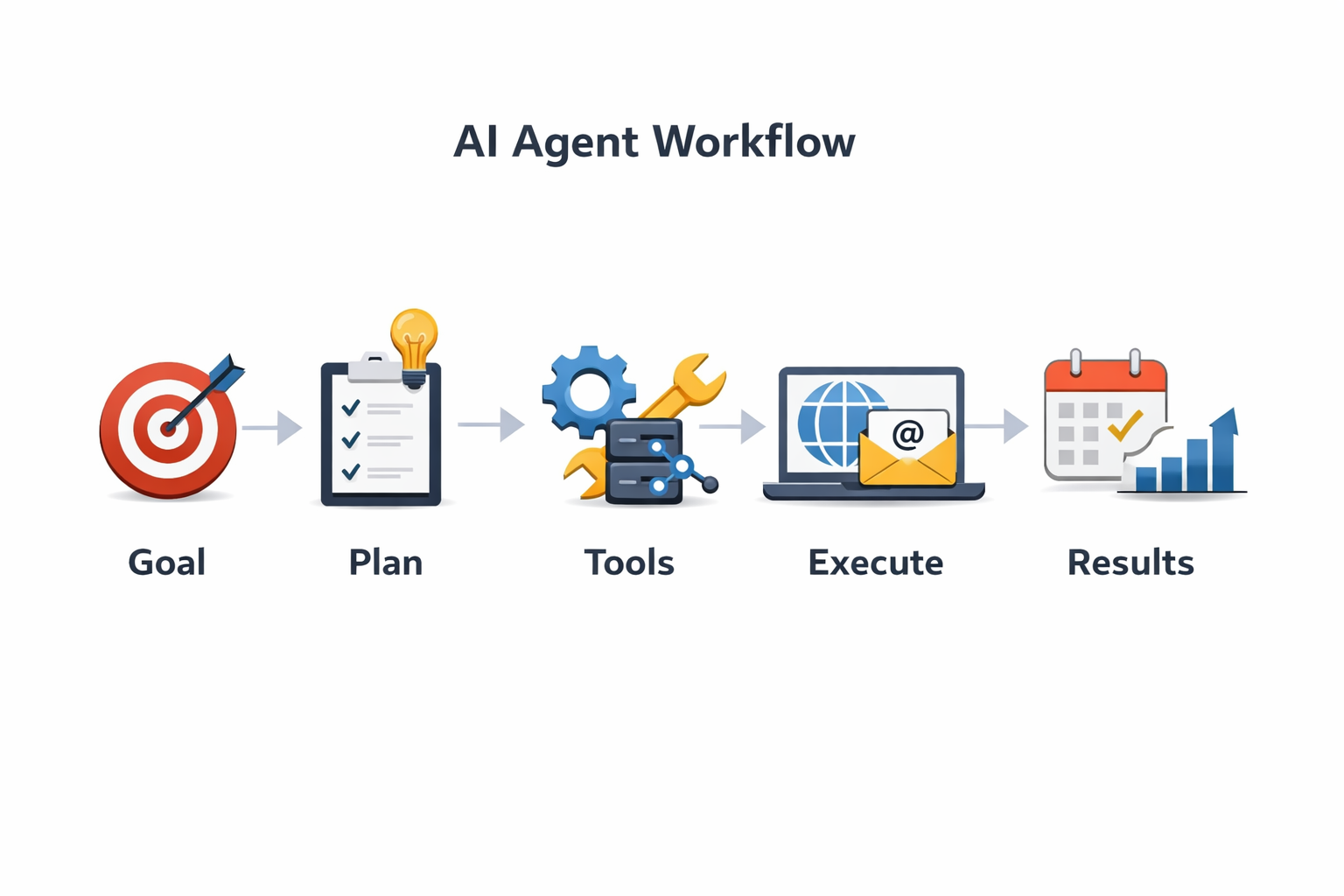
An AI agent operates in a loop:
- Receive goal — a task, objective, or trigger
- Plan — break the goal into steps
- Use tools — search the web, query databases, send emails, call APIs
- Evaluate — did the action work? What’s the next step?
- Iterate — repeat until goal is complete or escalation is needed
- Report — summarize what was done and any decisions made
The “tools” are what make agents genuinely powerful. Depending on how they’re set up, an agent might have access to:
- Web search (for research and real-time information)
- Your CRM (to look up customer data)
- Email and calendar (to communicate and schedule)
- Your knowledge base or documentation (to answer questions accurately)
- Payment and booking systems (to complete transactions)
- Analytics platforms (to pull reports and insights)
When you connect an agent to the right tools and give it clear goals, it becomes the closest thing most small businesses have ever had to a tireless, always-on team member.
Getting Started: A Practical Approach
You don’t need to overhaul your entire operation on day one. The businesses getting the best results from AI agents are starting small, validating quickly, and expanding from there.
Step 1: Pick One High-Friction Task
Look for the task on your team’s plate that is:
- Repetitive (done frequently)
- Rules-based (most cases follow a predictable pattern)
- Time-consuming (significant hours wasted per week)
- Low-stakes when handled automatically (errors are recoverable)
Classic starting points: lead follow-up, appointment reminders, FAQ responses, social media drafts, competitor monitoring.
Step 2: Define the Goal Clearly
AI agents work best with well-defined objectives. Vague instructions get vague results. Instead of “help with customer service,” try:
“When a customer submits a support request, check their account status in [CRM], look up their issue in the knowledge base, and reply with a resolution within 5 minutes. If the issue isn’t in the knowledge base or involves a billing dispute, flag it for human review with a summary of the account and issue.”
Specificity matters. The more clearly you can describe the desired outcome and the edge cases, the better the agent performs.
Step 3: Connect the Right Tools
Work with your implementation partner to connect the agent to the systems it needs. This usually means API integrations or using an orchestration platform like Zapier, Make, or n8n as the backbone.
Start with read-only access to reduce risk. Let the agent observe and summarize before it starts taking action. Upgrade permissions as you build trust in its performance.
Step 4: Monitor, Audit, and Improve
AI agents aren’t “set and forget” — especially at the start. Build in a review process:
- Check agent logs weekly for the first month
- Review a sample of completed tasks
- Note where it made good decisions and where it went off-script
- Update instructions and examples based on what you observe
Most early issues come from gaps in the agent’s instructions or tools, not from fundamental AI limitations. A few iterations usually produce a reliably good performer.
Real-World Impact: What to Expect
The businesses seeing the best ROI from AI agents in 2026 are reporting:
- 40–60% reduction in staff time on routine tasks like scheduling, follow-up, and basic support
- Faster response times — from hours to minutes — for inbound leads and customer inquiries
- More consistent execution — agents don’t have bad days, forget steps, or skip tasks when they’re busy
- Better data quality in CRMs and analytics, because agents log every action
The productivity gains compound. When your team stops spending half their day on repeatable tasks, they spend that time on things that actually require a human — building relationships, solving complex problems, growing the business.
Common Misconceptions
“AI agents will replace my team.” No. They handle volume and repetition, freeing your team for work that matters. The small businesses thriving with AI agents have better human teams — because their people are doing more valuable work.
“It’s too technical to set up.” The underlying technology is complex, but the user-facing tools are increasingly accessible. A knowledgeable implementation partner handles the technical integration. You define the goals and guardrails.
“I need perfect data or systems first.” You don’t. Agents are often good at working with messy data and can actually help clean and organize it. Start with what you have.
“It won’t understand my business specifically.” This is where customization matters. Agents trained on your knowledge base, your CRM data, and your communication examples quickly develop accurate context for your specific business.
The Competitive Reality
In 2026, AI agents are where chatbots were in 2022: early adopters are getting ahead, and everyone else is watching. The difference is the productivity gap that opens between businesses that implement well and those that don’t.
For small businesses in competitive local markets, that gap is particularly meaningful. When your competitor is still manually following up leads three days later and you’re closing them within the hour — that’s not a small advantage.
The technology is accessible. The ROI is real. The barrier is mostly implementation — knowing which agents to build, how to connect them to your systems, and how to configure them properly from the start.
Next Steps
If you want to start exploring AI agents for your business, the path forward looks like this:
- Audit your current workflows for high-friction, repetitive tasks
- Choose one process to automate as a proof-of-concept
- Define the goal, tools needed, and success criteria
- Work with an implementation partner to connect the right systems
- Monitor results, iterate on instructions, and expand from there
AI agents aren’t a future technology. They’re a present-day tool that small businesses can use right now to compete harder, serve faster, and grow more efficiently.
Ready to explore AI agents for your specific business? Contact Monsoft Solutions — we build and implement AI automation systems for local businesses and service practices across Southwest Florida and beyond.
Frequently Asked Questions
What’s the difference between an AI agent and a chatbot?
A chatbot responds to questions within a conversation, usually pulling from a knowledge base. An AI agent takes goals and completes multi-step tasks autonomously — using tools like search, email, and your CRM to actually do things, not just answer questions.
How much does it cost to implement AI agents for a small business?
Costs vary widely depending on complexity and the tools involved. Simple single-purpose agents (like a lead follow-up agent) can often be implemented for a few hundred dollars in setup plus $50–200/month in tool costs. More complex, multi-agent systems for larger operations run higher. Most small businesses see positive ROI within the first 60–90 days.
Are AI agents safe to use with customer data?
Yes, with proper configuration. The key is choosing tools with appropriate security practices (encryption, access controls, audit logs) and limiting agent access to only the data it needs. For healthcare practices, ensure any tools with patient data are HIPAA-compliant and backed by a Business Associate Agreement (BAA).
How long does it take to set up an AI agent?
A focused, single-task agent can be configured and tested within 1–2 weeks. More sophisticated agents with multiple tool integrations typically take 3–6 weeks to build, test, and refine. Unlike custom software development, most of the time is in configuration and testing — not coding.
Can AI agents work with the tools I already use?
Usually, yes. Modern AI agent platforms integrate with hundreds of business tools via API — including popular CRMs, email platforms, scheduling systems, and communication tools. Your existing tech stack is often a strong foundation to build on.